Posts mit dem Label blogger werden angezeigt. Alle Posts anzeigen

WordPress or Joomla


We’ve made it! Over the past five weeks we have taken an in-depth look at the two most popular content management systems currently available. We have critically analyzed both WordPress and Joomla in a number of different departments. We have discovered the strengths and weaknesses of each system and figured out that neither one of them does everything perfectly.

Today, I’m going to summarise the conclusions we’ve reached each week in this series and provide some final thoughts on the CMS war.

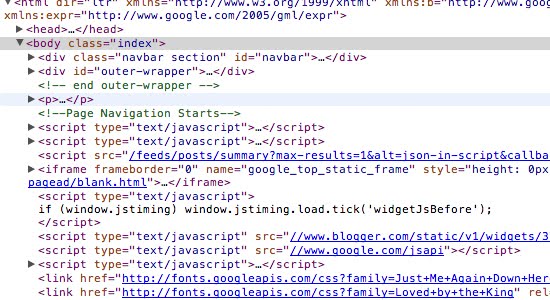
Add blogger body class


If you want to make a difference between home page and post page, you can use this code.
Here the step to make them

Remove the Blogger Banner bar

To hide the Blogger Navbar:

1. Log in to blogger
2. On your Dashboard, select Layout. This will take you to the Template tab. Click Edit HTML. Find this code:
#header-wrapper

3. Copy this css and then Paste in the top of them:
#navbar-iframe {
display: none !important;
}

Position fixed on top if scroll down


If you have content that want to remain in the browser when the scrol down, here's how. Here the example: http://wiyono06.blogspot.com You usually use javascript for it.
You can see an example on my blog, which is in addition to the fixed menu at the top when scrolling down

Here I use the "sidebar-wrapper"
Follow the following steps:
1. Copy this code:
<script src="http://ajax.googleapis.com/ajax/libs/jquery/1/jquery.js" type="text/javascript"></script>
<script src="https://wiyono05.googlecode.com/svn/trunk/scroller-fixed-top/scroller.js" type="text/javascript"></script>

2. And then find this code:
#sidebar-wrapper

3. Then paste the code below:
#sidebar-wrapper.fixed {position: fixed;top: 0;}

You're done, save and preview.............

Removing blogger footer menu

I mean in this case is the menu at the footer, ie "New Post", "Old Post", "Home" and "Subscribe".

And it was very easy and simple.
The trick is as follows:

1. Copy this code:
#blog-pager-newer-link, #blog-pager-older-link, #blog-pager, .feed-links {
display:none;
}

2. And then go to Dasboard > Edit HTML and find this code:
#blog-pager-newer-link {
float: $startSide;
}

3. Then paste above code
You're done, save and preview!!! :-)

Create current menu in Blogger


This is a continuation of the codevious tutorial, which is "Create menu in Blogger"
If you already have the menu as in the codevious tutorial, this step is the right step to make the current menu

The steps are:
1. Find this code:

Create menu in Blogger


In this post I will write how to create menus in blogger, for example "Home, About Us, Contact"

This is the demo


To start it before the important thing is to make pages that will be given a menu, so make first page "Home, About Us, Contact".

This first is needed to create a menu is given gadgets "Linkliste"

And these steps:

Welcome to my blog


After my account is blocked again I finally got an account so that it can exist again in blogger, because I lost all the blog.....
To that I say welcome to the second generation of my blog...........

I hope this blog can be useful for anyone in need.


Tanda tanya from wiyono on Vimeo.